Using Cloudflare AI Gateway patchLog to Grow LLM Evaluation Logs
A small experiment on adding feedback, score, and metadata back to Cloudflare AI Gateway logs so LLM request logs can become the start of an evaluation loop.
Introduction
Cloudflare AI Gateway is useful as an entry point for LLM observability. By routing LLM calls through it, you can inspect provider, model, status, duration, token usage, cost, prompt, and response. In a previous article, I looked at how much of an LLM request and response AI Gateway can log.
How Much of LLM Requests and Responses Can You Log with AI Gateway?
But viewing logs is not the same as building an improvement loop. In operations, the question quickly becomes: was this answer useful, should it be regenerated, and can I extract it later as evaluation data?
That is where Cloudflare AI Gateway’s Patch Gateway Log API becomes interesting. As of July 3, 2026, the Cloudflare API reference shows that an AI Gateway log can be patched with feedback, score, and metadata. The documented range is -1 to 1 for feedback, 0 to 100 for score, and a metadata map whose values are strings, numbers, or booleans. Cloudflare’s Custom metadata docs also state that up to five custom metadata entries are saved per request.
That small API changes how I look at AI Gateway. It is not only a proxy and log viewer. It can also become a lightweight place to return evaluation signals to the same log entry.
Target Shape
This article does not claim that AI Gateway replaces a full AgentOps platform. Tools like Langfuse are still a better fit when you need traces, spans, generations, datasets, eval runs, and scores across multi-step applications.
The target here is narrower.
LLM request
  ↓
AI Gateway log
  ↓
PATCH feedback / score / metadata
  ↓
Search and extract candidates for improvement
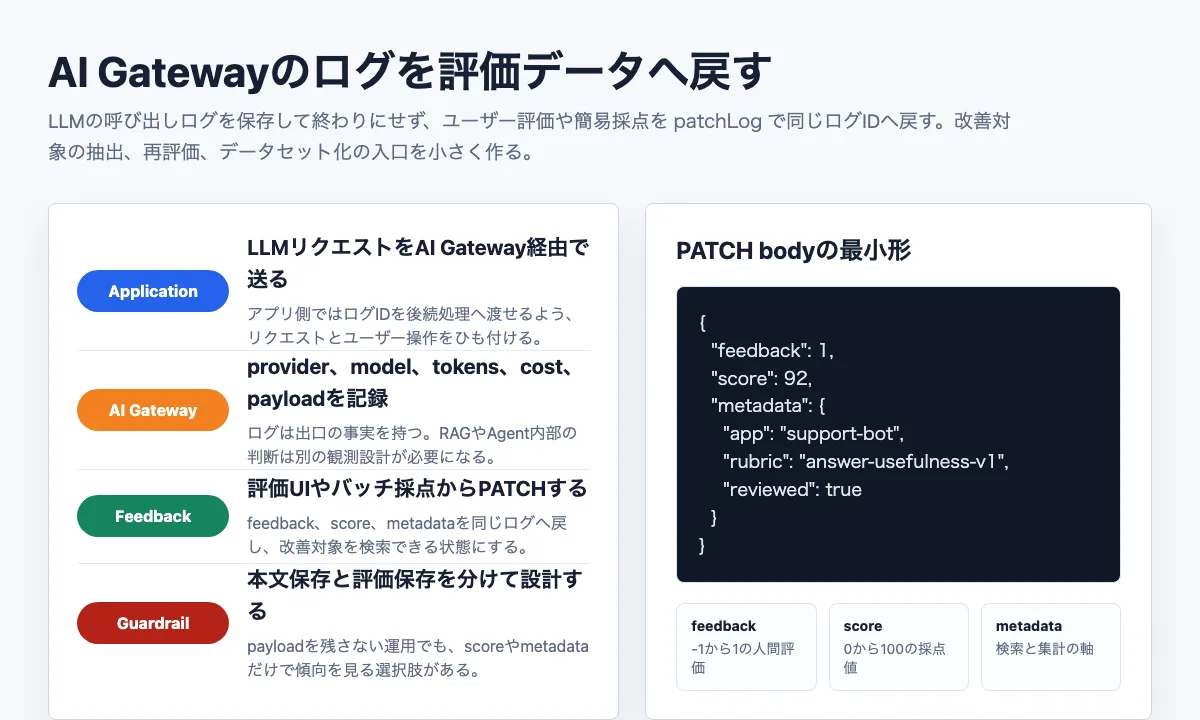
AI Gateway logs represent the facts at the LLM provider boundary. If we can add human feedback, a rubric score, and searchable metadata to that boundary log, it becomes easier to extract low-quality calls, compare model changes, and analyze quality together with token usage, cost, and latency.
The boundary still matters. AI Gateway does not explain which document a RAG system retrieved, which tool an agent called, or which branch the application took before calling the model. For that, the application still needs its own tracing design.
What the API Provides
The Cloudflare API reference exposes several AI Gateway log operations, including:
The patch endpoint has this shape:
PATCH /accounts/{account_id}/ai-gateway/gateways/{gateway_id}/logs/{id}A minimal body can look like this:
{
  "feedback": 1,
  "score": 92,
  "metadata": {
    "app": "support-bot",
    "rubric": "answer-usefulness-v1",
    "reviewed": true
  }
}
I would treat feedback and score differently. feedback is a coarse human signal, such as thumbs up or thumbs down. score is better reserved for a rubric-based evaluation. Metadata is the search surface: application name, environment, feature, rubric name, experiment flag, or other non-sensitive grouping keys.
Metadata should also stay small. Cloudflare’s Custom metadata docs say that only up to five entries are saved per request, and entries beyond that are ignored. In practice, that means choosing keys such as app, env, feature, rubric, and failure_case deliberately instead of treating metadata as an open-ended JSON object.
Worker Binding Shape
The live verification in this article uses the REST API directly. In a Cloudflare Workers application, however, the Workers AI binding gives a more natural shape: run the model through a gateway, read the generated log id, then patch that log when the application receives feedback.
Cloudflare’s Custom metadata docs show env.AI.run() with gateway.metadata. The Workers type definitions also expose env.AI.aiGatewayLogId and env.AI.gateway("...").patchLog(logId, data). Combining those pieces, the application-side flow can look like this:
export interface Env {
  AI: Ai;
}

export default {
  async fetch(_request, env): Promise<Response> {
    const gatewayId = "patch-log-feedback-loop";

    const answer = await env.AI.run(
      "@cf/meta/llama-3.1-8b-instruct-fast",
      {
        prompt: "Write a short support reply.",
      },
      {
        gateway: {
          id: gatewayId,
          metadata: {
            app: "support-bot",
            env: "production",
            rubric: "answer-usefulness-v1",
          },
        },
      },
    );

    const logId = env.AI.aiGatewayLogId;

    if (logId) {
      await env.AI.gateway(gatewayId).patchLog(logId, {
        feedback: 1,
        score: 92,
        metadata: {
          app: "support-bot",
          env: "production",
          rubric: "answer-usefulness-v1",
          reviewed: true,
        },
      });
    }

    return Response.json({ answer, logId });
  },
} satisfies ExportedHandler<Env>;
The point is to connect the AI Gateway log id with the application event. For example, the app can store the logId alongside its message id, then call patchLog() when the user clicks thumbs up or thumbs down.
I did not execute this Worker Binding version for this article. The verified experiment below uses the REST API. This snippet is included to connect the article’s patchLog theme with the shape a Cloudflare Workers app would likely use.
Verification Script
For this article, I created a small Node.js verification script. It is not an official Cloudflare CLI. Its job is to build a safe PATCH request body, validate it before sending, and optionally call the Cloudflare API only when --apply is used.
Without credentials, it can run in dry-run mode:
npm run dry-runThe output is intentionally redacted:
# AI Gateway patchLog dry run

case: helpful
endpoint: https://api.cloudflare.com/client/v4/accounts/<account_id>/ai-gateway/gateways/<gateway_id>/logs/<log_id>

request body:
{
  "feedback": 1,
  "score": 92,
  "metadata": {
    "app": "blog-ex",
    "env": "local",
    "rubric": "answer-usefulness-v1",
    "reviewed": true
  }
}
To actually patch a Cloudflare log, the script requires an API token with AI Gateway Write permission and a real AI Gateway log id:
node scripts/patch-log-feedback-loop.mjs --apply --case helpfulFor the live test, I did not use a valid external provider API key. That would add provider billing and model response concerns that are not central to this article. Instead, I created a dedicated AI Gateway, sent one OpenAI-compatible request with an intentionally invalid OpenAI API key, and used the resulting 401 Unauthorized log as the target for patchLog.
The live script performs the whole sequence: create the gateway if needed, send one gateway request, poll the Logs API for the generated log id, PATCH evaluation fields onto that log, and fetch the log again.
npm run live:patch-logThe result looked like this.
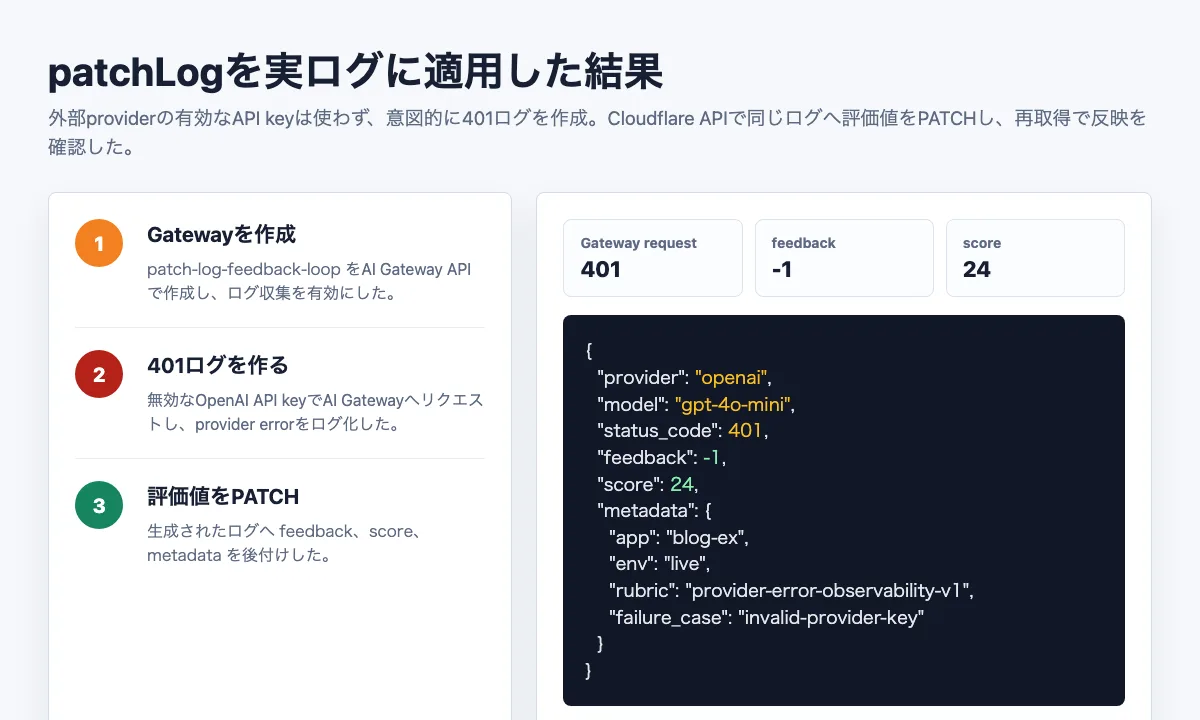
The gateway request failed with 401 Unauthorized, as expected. The generated AI Gateway log recorded provider: "openai", model: "gpt-4o-mini", and status_code: 401. Before the patch, it had request metadata but no feedback or score.
Then I patched the log with this body:
{
  "feedback": -1,
  "score": 24,
  "metadata": {
    "app": "blog-ex",
    "env": "live",
    "rubric": "provider-error-observability-v1",
    "failure_case": "invalid-provider-key"
  }
}
After fetching the same log again, the response included feedback: -1, score: 24, and metadata.failure_case: "invalid-provider-key". So the core API behavior is verified: evaluation fields can be added to a real AI Gateway log after the request has already been recorded.
This test confirms API-level reflection, not dashboard rendering. It also uses an intentional provider-authentication error log, not a successful model response. A successful response log, dashboard display, List Logs filtering, and integration with Datasets or Evaluations remain good follow-up tests.
Why Validate First
The validation layer is small, but it matters because evaluation data is usually aggregated later. A malformed score or loosely structured metadata field may not break the UI immediately, but it will make analysis harder.
The script rejects these cases before sending:
| Field | Accepted | Rejected |
|---|---|---|
feedback | Number from -1 to 1 | Out of range or non-number |
score | Number from 0 to 100 | Out of range or non-number |
metadata | Map of string, number, boolean values, up to five entries | Arrays, objects, null, designs that rely on the sixth entry or beyond |
This simply mirrors the API shape, but placing the check in the application keeps the evaluation dataset predictable.
Pairing It with Payload Controls
In the previous AI Gateway logging article, I also looked at payload controls:
cf-aig-collect-log-payload: falseIf request and response payloads are not stored, debugging becomes harder. However, model, status, duration, tokens, cost, feedback, score, and metadata can still support trend analysis. That gives a practical middle ground: do not store sensitive text, but keep enough quality signals to detect where the system is getting worse.
For example:
{
  "feedback": -1,
  "score": 32,
  "metadata": {
    "app": "support-bot",
    "env": "production",
    "topic": "billing",
    "rubric": "answer-usefulness-v1"
  }
}
This would let you notice that billing-related answers are receiving lower scores without exposing the original user text in the gateway log.
Relationship to Langfuse
My conclusion is that AI Gateway and Langfuse solve different parts of the problem.
AI Gateway is strong at the LLM provider boundary: provider, model, tokens, cost, duration, status, payload, and now lightweight feedback or scoring on the same log. Langfuse and similar tools are stronger inside the application: traces, tool calls, RAG steps, datasets, eval runs, and score history.
So I would not treat patchLog as a replacement for a dedicated AgentOps tool. I would treat it as a lightweight feedback entry point for the LLM call itself. If the application also keeps an internal trace id or session id, AI Gateway log ids can be connected to a richer trace later.
Design Notes
Before using this pattern in an application, I would decide four things.
First, define the meaning of feedback and score. A simple split is human reaction for feedback and rubric evaluation for score.
Second, define metadata vocabulary. If every feature invents its own keys, filtering becomes unreliable. Because only up to five metadata entries are saved per request, each key should be something you expect to filter or aggregate later.
Third, decide payload storage policy. Keeping payloads helps debugging, but it also turns logs into sensitive data.
Fourth, design log id handoff. When a user clicks thumbs up or thumbs down, the application must know which AI Gateway log should receive the patch.
That last point is where the implementation gets real. The API is small, but a feedback loop needs request ids, UI events, metadata conventions, and privacy choices to line up.
Summary
Cloudflare AI Gateway’s Patch Gateway Log API is a small but useful building block. It can add feedback, score, and metadata to an existing LLM request log, turning a plain traffic log into the beginning of an evaluation loop.
In this version, I verified local request body construction, validation, redaction, and a real Cloudflare API patch against an actual AI Gateway log. The target log was an intentional 401 provider-authentication error, created without a valid external provider API key. Dashboard rendering, filtering behavior, successful model-response logs, and connection to Datasets or Evaluations still need follow-up tests.
Even with that limitation, the design lesson is clear: if AI Gateway is already logging your LLM calls, it is worth planning how evaluation signals will return to those logs. Logs become much more useful when they can receive feedback, not just display traffic.