Building the Foundation of an AI Chatbot with Cloudflare Pages, Workers, and AI Gateway
A small implementation experiment combining Cloudflare Pages, Pages Functions, Workers AI bindings, and AI Gateway to build an AI chatbot without exposing model credentials to the browser.
When you start using Cloudflare AI Gateway, the first mental model is often “replace the LLM API URL and logs become visible.” That is a reasonable starting point. But once you try to publish an AI chatbot, there are a few more design decisions to make.
Do not put model credentials in the browser. Separate the frontend from the LLM call boundary. Make AI Gateway logs, cache behavior, and metadata visible enough for later operations. Even for a small bot, leaving these points vague tends to create the familiar situation where “it works, but I cannot tell what is happening.”
In this article, I build the foundation of an AI chatbot using Cloudflare Pages, Pages Functions, Workers AI bindings, and AI Gateway. The experiment first checks the API boundary and Gateway options in local mock mode, then switches to CHAT_MODE=live to verify a real Workers AI model call and AI Gateway log retrieval.
The Shape of the Experiment
The architecture is intentionally small.
Browser
  ↓
Cloudflare Pages static UI
  ↓ /api/chat
Pages Function on Workers runtime
  ↓ env.AI.run(..., { gateway })
Cloudflare AI Gateway
  ↓
Workers AI model
Pages serves the static UI, and only /api/chat is handled by a Pages Function. AI Gateway sits in the middle of the LLM call as an observability and control layer. In Cloudflare’s documentation, the Workers AI binding can call env.AI.run(), and the third argument can include gateway options. This is where you pass the Gateway ID, cache controls, log collection setting, and metadata.
The sample uses the Workers AI model @cf/zai-org/glm-5.2. Since Workers AI uses Cloudflare account resources even during local development, I did not start by calling the real model. I first checked the UI and API contract in mock mode, then moved to live mode.
Build the UI and API Boundary First
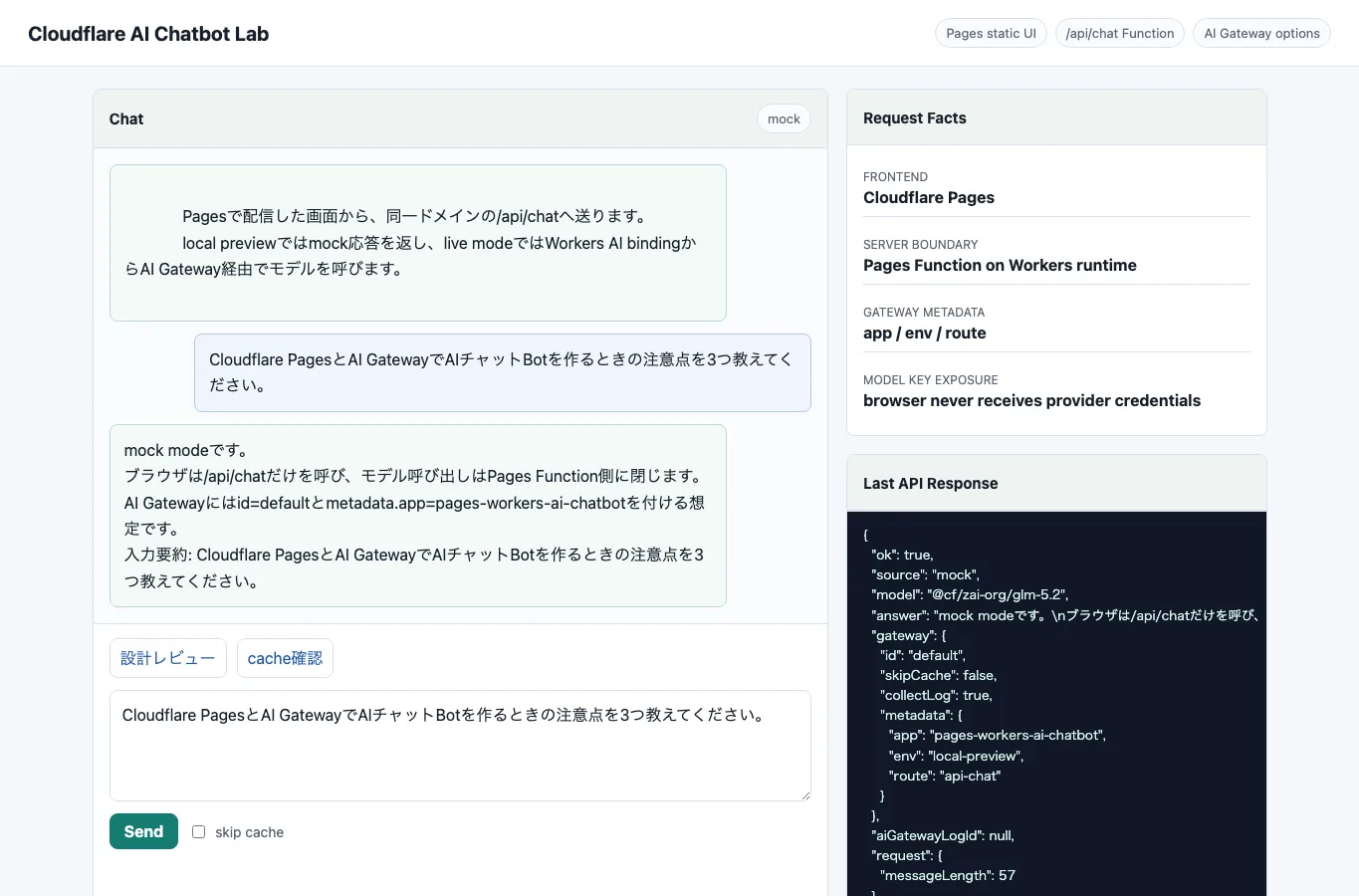
The Pages UI is a simple chat screen. The browser sends only message and skipCache to /api/chat. The model name, Gateway ID, metadata, and AI binding stay on the server side.
The Pages Function itself stays thin and delegates to a shared handler.
import { handleChat, handleOptions } from "../../src/chat.mjs";

export const onRequestPost = (context) => handleChat(context);

export const onRequestOptions = () => handleOptions();

export const onRequestGet = () =>
  Response.json({
    ok: true,
    route: "/api/chat",
    methods: ["POST", "OPTIONS"],
  });
With this split, the same handleChat() can be used both as a Pages Function and from the local mock server. That keeps input validation and response shape aligned.
Build AI Gateway Options in the Application
With Cloudflare’s AI binding, env.AI.run() can receive not only the model input but also Gateway options. In this sample, I attach the Gateway ID, whether to skip cache, whether to collect logs, and metadata for identifying the application.
const raw = await env.AI.run(
  model,
  {
    messages,
  },
  {
    gateway: {
      id: env.CLOUDFLARE_AI_GATEWAY_ID ?? "default",
      skipCache: Boolean(body.skipCache),
      collectLog: env.COLLECT_AI_LOG !== "false",
      metadata: {
        app: "pages-workers-ai-chatbot",
        env: env.ENVIRONMENT ?? "local",
        route: "api-chat",
      },
    },
  },
);On the other hand, values such as user IDs or inquiry IDs need care. AI Gateway logs are useful for operations, but in this experiment I confirmed metadata-oriented fields such as provider, model, status, duration, cost, token counts, and metadata. Whether prompt and response bodies should be stored, and who should be able to view them, must be decided separately based on Gateway log settings, payload retention policy, and the application’s data classification.
Check Locally in Mock Mode
I did not connect to the real model first. The reason is simple: the first thing I wanted to verify was not answer quality, but the boundary of the AI chatbot.
The verification commands are:
npm run check
npm run dev
npm run verify
npm run check runs node --check against the sample JavaScript files. npm run dev starts a local mock server for the static Pages UI and /api/chat. npm run verify is a verification script prepared for this article. It sends requests to /api/health and /api/chat in the running local preview and checks:
- The health endpoint returns
ok=true. - Local preview uses
source=mock. - The Gateway ID is built as
default. - Metadata includes
app,env, androute. - Empty messages return HTTP 400.
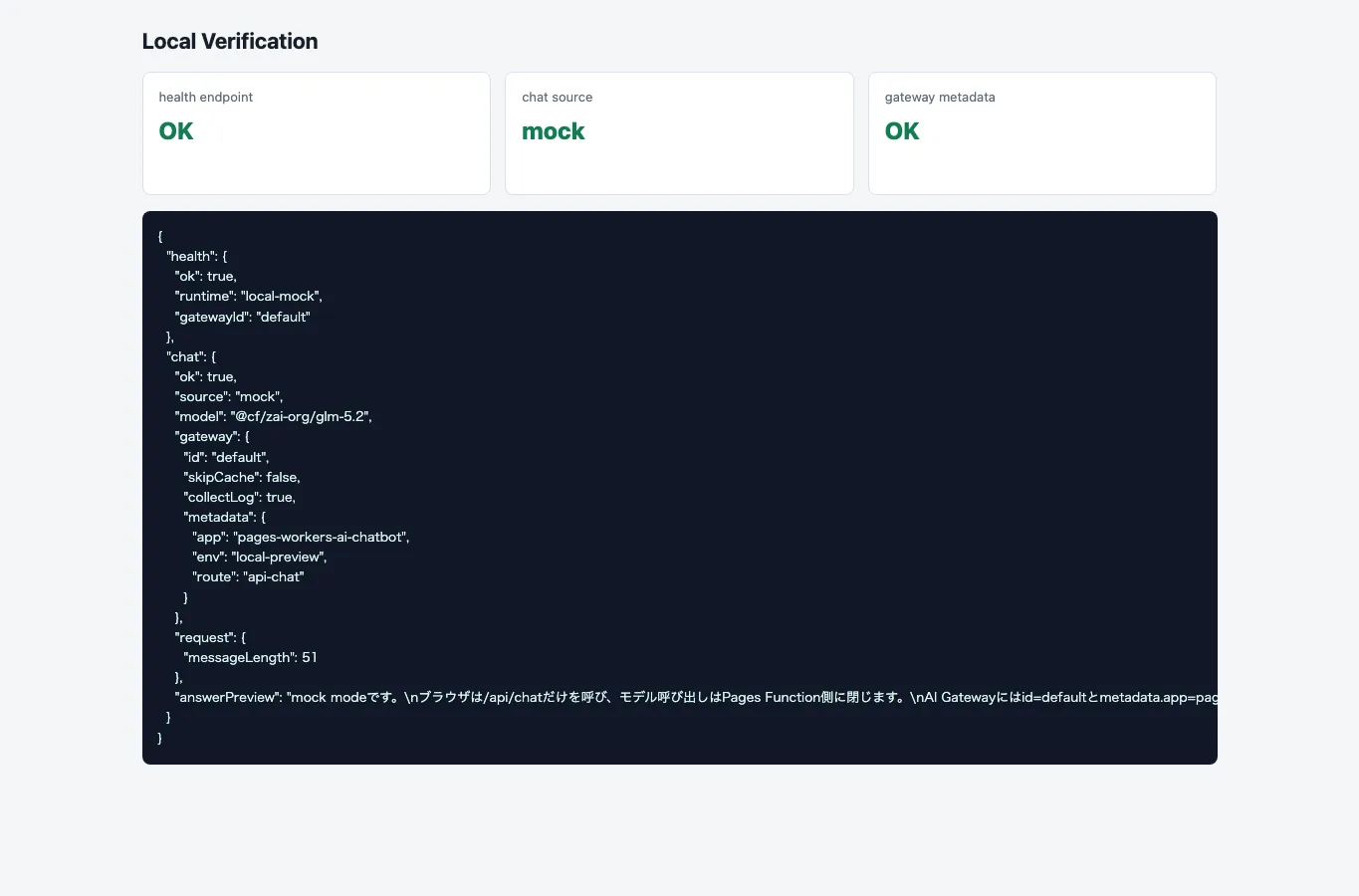
At this point, I had verified the UI, API, input validation, and Gateway option construction. Stopping here would not be enough to call it an experiment, so the next step was a real Workers AI call and AI Gateway log retrieval.
Use the Workers AI Binding in Live Mode
To call the real model in Cloudflare or Wrangler live preview, set CHAT_MODE=live. With Wrangler, start Pages with the AI binding.
wrangler login
npx wrangler pages dev public \
  --port 8790 \
  --compatibility-date=2026-07-03 \
  --ai AI \
  --binding CHAT_MODE=live \
  --binding CLOUDFLARE_AI_GATEWAY_ID=default \
  --binding AI_MODEL=@cf/zai-org/glm-5.2 \
  --binding ENVIRONMENT=local-live \
  --binding COLLECT_AI_LOG=true \
  --binding ENABLE_LOG_INSPECTION=true
The sample wrangler.jsonc configures the AI binding as AI.
{
  "name": "cloudflare-pages-workers-ai-gateway-chatbot",
  "compatibility_date": "2026-07-03",
  "pages_build_output_dir": "public",
  "ai": {
    "binding": "AI"
  },
  "vars": {
    "CHAT_MODE": "live",
    "CLOUDFLARE_AI_GATEWAY_ID": "default",
    "AI_MODEL": "@cf/zai-org/glm-5.2",
    "ENVIRONMENT": "preview",
    "COLLECT_AI_LOG": "true",
    "ENABLE_LOG_INSPECTION": "false"
  }
}
I first tried compatibility_date: "2026-07-04", but Cloudflare rejected it as a future date at the time of verification. Even though the local environment date was July 4, 2026, Cloudflare had not accepted that date yet, so I changed it to 2026-07-03 and continued.
One important point here is that when calling Workers AI through the Workers AI binding, no external provider API key is exposed to the browser. This sample assumes Workers AI inside Cloudflare, so it differs from a design where OpenAI or Gemini keys are stored as Worker secrets.
If you want to call external providers such as OpenAI or Anthropic with your own keys, you need to revisit the AI Gateway provider-native endpoint or REST API design. Cloudflare’s documentation explains that third-party models called through the AI binding use Cloudflare Unified Billing, and BYOK is not simply passed into the AI binding.
This is where the old “just replace the OpenAI-compatible URL” mental model gets a little slippery. Honestly, it is easy to get confused here at first.
Verify the Real Model Call and AI Gateway Log
In live mode, I sent one request to /api/chat. The response showed source=workers-ai, the model was @cf/zai-org/glm-5.2, and the Gateway options included id: "default", skipCache: true, collectLog: true, and metadata with app, env, and route.
Then I used the returned aiGatewayLogId to call the verification-only /api/ai-gateway-log endpoint and retrieve a summary of the AI Gateway log. This verifies the same log entry that appears in Cloudflare’s AI Gateway logs, using the AI binding’s getLog().
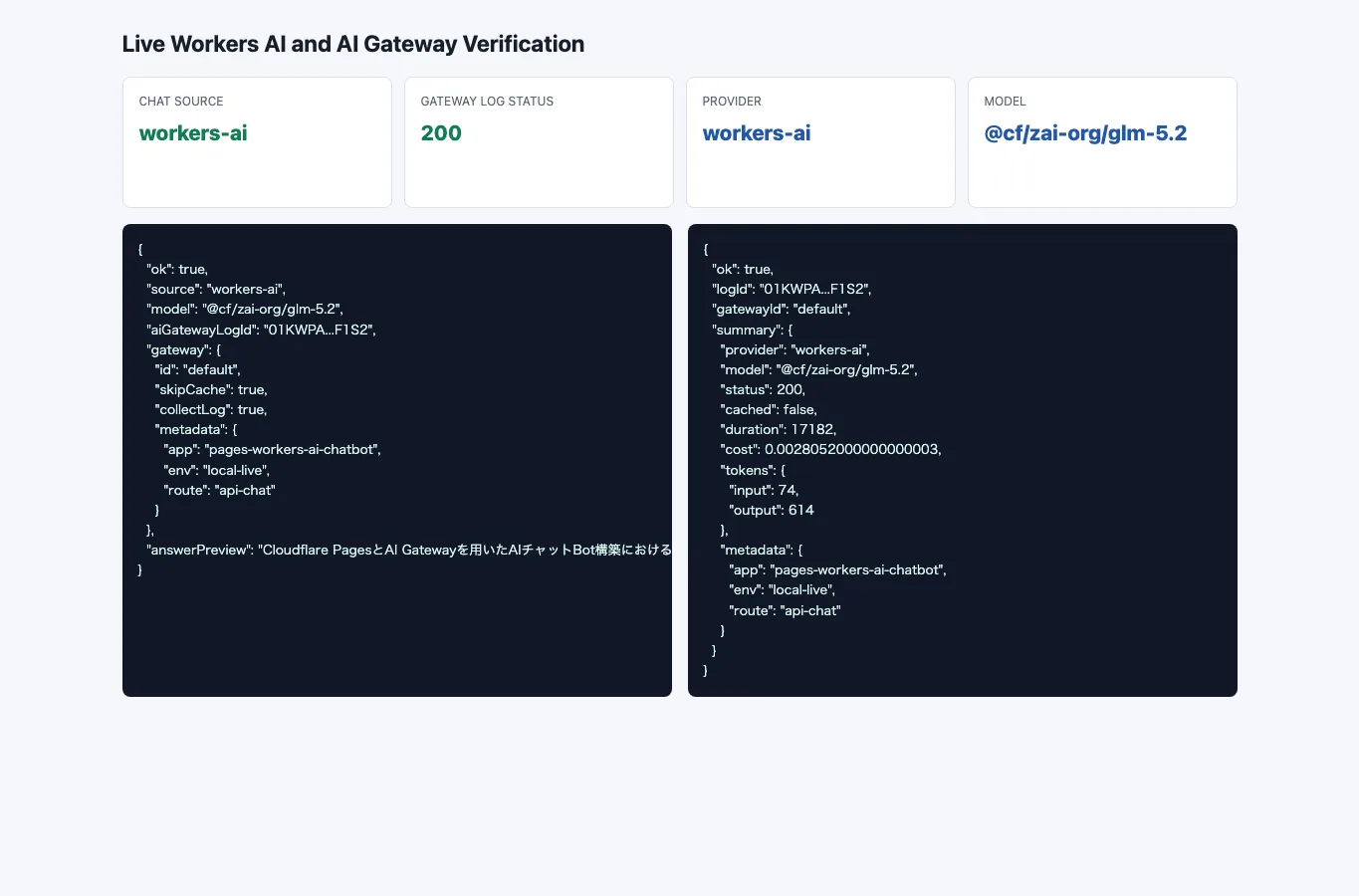
The AI Gateway log summary I retrieved was:
| Field | Result |
|---|---|
| provider | workers-ai |
| model | @cf/zai-org/glm-5.2 |
| status | 200 |
| cached | false |
| duration | 17182 ms |
| cost | 0.0028052000000000003 |
| tokens in | 74 |
| tokens out | 614 |
| metadata | Confirmed app, env, and route |
| prompt / response body | Not included in this getLog() summary |
This confirmed that the request did not merely return a model response from the Worker. It was also recorded as an AI Gateway log, and I could later inspect provider, model, status, duration, cost, token counts, and metadata. On the other hand, this artifact did not include the prompt body or response body. If you plan to use payload bodies operationally, you need to verify the AI Gateway log settings and payload retention policy separately.
Do Not Oversell Cache-Based Cost Reduction
AI Gateway caching looks attractive for chatbots. If the same question can be answered without calling the upstream model, it may reduce both latency and cost.
Caching is better suited to FAQs, fixed menus, templated questions, or repeated calls with the same system prompt and user prompt. For personalized consultation-style bots, metadata, logs, rate limits, and payload retention policy usually matter before cache does.
The skip cache control in this UI is not there because cache should always be enabled. It is there to force the question: can this request be cached safely?
Even a Small Bot Surfaces Operational Questions Early
The biggest takeaway from this experiment is that implementation and operations cannot be completely separated, even in the smallest AI chatbot setup.
Putting the UI on Pages and routing /api/chat to a Function is straightforward. Calling a model with env.AI.run() is also not difficult. But once you think of it as a public bot, these questions appear immediately:
- Should prompt and response bodies be stored in Gateway logs?
- What granularity of identifiers should be placed in metadata?
- Which questions can use cache, and which should always call the model?
- Should local preview call the real model, or should it only verify the API contract with mocks?
- Should the app use Workers AI, or call external providers through provider-native endpoints?
If you postpone these questions, the first build may be faster. But when a user says the answer is strange, slow, or expensive, you will not know where to look.
Personally, I think Cloudflare Pages + Workers + AI Gateway is a strong fit for individual projects and small AI applications. Static UI, API boundary, inference, and the first observability layer can all live on the Cloudflare side. At the same time, AI Gateway alone does not complete AgentOps.
AI Gateway is an entry point for seeing the boundary of LLM calls. If you need to know which documents a RAG system retrieved, which tools an agent called, or how user feedback changed over time, you still need an application-level tracing design such as Langfuse.
Summary
By combining Cloudflare Pages, Pages Functions, Workers AI bindings, and AI Gateway, you can build the foundation of an AI chatbot without exposing model credentials to the browser. In this experiment, I first sent requests from the static UI to /api/chat and verified input validation, mock responses, Gateway ID, and metadata with the same handler. Then I switched to live mode, received a real response from GLM-5.2 on Workers AI, and confirmed that AI Gateway logs exposed provider, model, status, duration, cost, token counts, and metadata.
There are still follow-up checks, especially cache HIT/MISS behavior, payload retention policy, and BYOK designs for external providers. Cache in particular is not a general solution for all free-form chat. It works best when requests are identical or highly templated.
Starting with mock mode to stabilize the API boundary, then moving to Wrangler live mode to verify Workers AI and AI Gateway logs, keeps model quality, Cloudflare bindings, and UI issues from becoming one large debugging problem.