Why I Stopped Polishing Prompts and Started Using Feedback Loops
I explain why output quality stays unstable even with careful prompt design, and how I switched to a generate-evaluate-feedback-regenerate loop. Includes the smallest manual steps to start today.
This article is part of " Loop Engineering " series (Part 1) — 5 posts

To be honest, I was exhausted. No matter how much time I spent refining prompts, the output still drifted.
Adding more detail, more examples, assigning roles, specifying output formats — all of them help. But the moment I try to push quality past a certain point with prompt changes alone, I hit a wall fast.
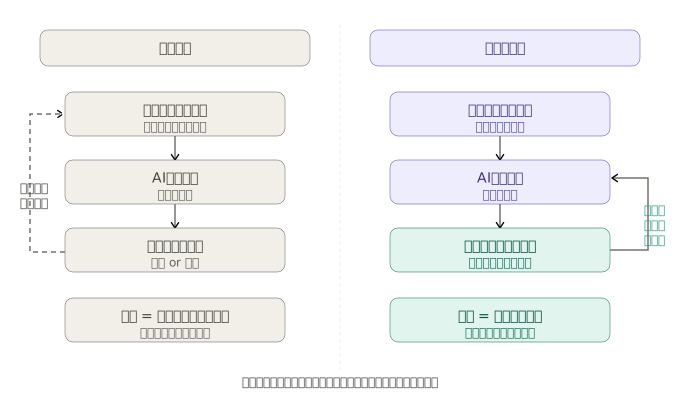
What felt off to me was that I was asking for a perfect answer in a single shot. When I thought about it calmly, human work rarely produces a finished product on the first try. We review, revise, and check again. The idea that I should do the same with AI is where loop design started for me.
What a loop is
What works here is a loop of execute, evaluate, fix, and re-execute.
Run the AI
  ↓
Evaluate with a rubric
  ↓
Give specific feedback on what is missing
  ↓
Re-run
  ↓
Repeat until conditions are met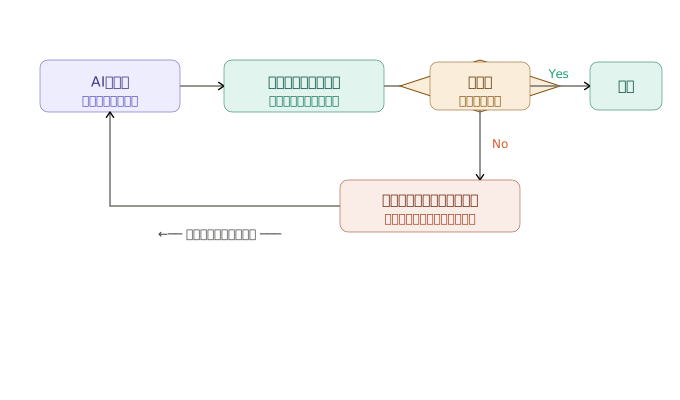
Instead of asking the AI to “answer smarter,” I design an environment that makes smart behavior easier. I call this approach loop design.
In other words, I stopped betting output quality on how clever my prompt is, and started raising the floor with a system of evaluation and revision.
Who runs the loop
At first, a human running the loop manually is enough.
I look at the AI output, say “this part is missing,” and ask it to try again. Honestly, that alone changes the output quite a bit. In my case, I had Claude Code draft a blog post, then read it back and gave feedback like “the conclusion is missing from the opening” and “there are zero concrete examples.” Just that made the second output much better.
Once I got used to it, I could let the AI run the loop autonomously. In environments like Claude Code, I can give instructions like “keep reviewing and revising until these conditions are met,” which automates it to some degree.
To really stabilize it, I write code that calls the API, runs it through an evaluation function, and re-runs until conditions are met.
But I don’t need to build that from day one. It’s faster to run the loop manually two or three times first and see which evaluation criteria actually matter. Personally, I’ve tried to automate with APIs too early, let the rubric design get sloppy, and then couldn’t tell whether the loop itself was any good. That’s why I recommend starting manually.
The rubric decides quality
The effectiveness of the loop is almost entirely decided by the quality of the evaluation criteria.
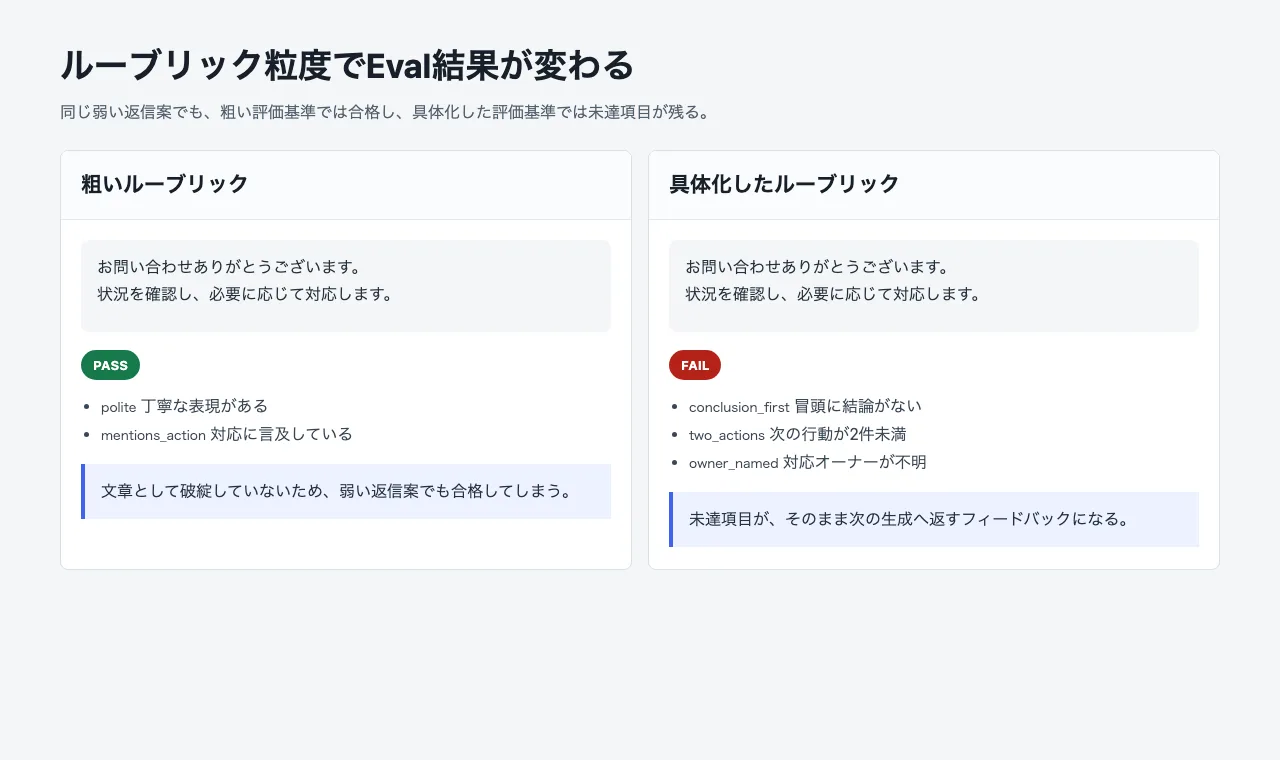
If this part is rough, I can’t judge whether the output actually improved after a loop. Ambiguous criteria leave the AI with no way to evaluate.
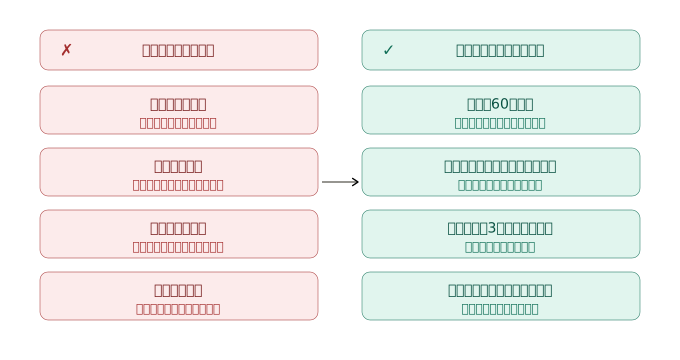
For example, “readable writing” is hard to evaluate. What counts as readable differs by person, so the AI’s scores drift.
On the other hand, conditions like these are much easier to score:
- Each sentence is 60 characters or fewer
- Technical terms have a short explanation on first use
- The conclusion appears within the first three paragraphs
- The next action is stated at the end
A good rubric isn’t something you finish on the first try.
I write out 3–5 items that define “good output,” ask the AI to make a draft based on them, apply it to actual output, and cut the vague items. Repeating this lets the criteria themselves grow. Personally, about half of my first rubric gets rewritten after I see real outputs and realize “this item isn’t something I can judge with.”
Evaluate in a separate context
A common pitfall in loop design is letting the same AI that generated the output grade itself.
When people grade their own work, they go easy on themselves. The same thing happens with AI. If I ask “does this pass?” right after generation, within the same context, the bias leans toward confirming its own output.
Evaluation is more trustworthy when run in a separate context from generation.
In practice, I split the generation call from the evaluation call. The evaluator gets only the original instruction, the generated result, and the rubric, and returns whether it passes or which items are missing if it doesn’t.
Even with the same model, separating the context changes the meaning of the evaluation. To be honest, I was skeptical of this “context separation” at first, but after trying it, the difference from self-grading was clear.
”Try again” is not an instruction
How I deliver feedback also matters.
“Your previous output failed. Please try again” barely works as instruction. The AI doesn’t know what to fix.
Honestly, I fell into this trap early on too. I gave vague feedback like “make it better” or “be more specific,” and got frustrated when the output barely changed.
What I should pass instead is a concrete list of unmet items.
Item 3 is unmet.
There were zero concrete examples. Please add two examples that map to real work.

Item 4 is unmet.
The last paragraph ends with an impression. Please add three concrete next steps.
Instead of “try again,” I return what is missing, by how much. That single difference changes the re-run output significantly.
Not for every task
Loop design has a cost.
I need to build evaluation criteria, and each re-run adds API cost and latency. If I automate it, I also need a max-iteration limit to prevent infinite loops, and a design that hands off to a human on failure.
So I shouldn’t use it for every task. Personally, I made the mistake of adding loops even to simple transformations early on, and I regret the wasted cost.
It fits tasks like these:
- Recurring tasks
- Tasks where evaluation criteria can be expressed in words
- Tasks where the first output has room for improvement
- Tasks where failure reasons can be fed into the next run
For example, drafting articles, generating SQL, fixing code, extracting structured data, and drafting support replies work well.
On the other hand, simple validation, calculations, regex-based conversions, and one-off small tasks are not a fit. For these, writing code to verify the result is faster and cheaper than running a loop.
When in doubt, I ask whether the generation is hard but the check is easy. If I can check it, it’s a candidate for loop design.
The smallest loop you can start today
I don’t need to build an agent framework from scratch.
Starting small and manually is enough.
- Pick one AI task you do repeatedly
- Write 3–5 conditions for good output
- Run it once
- Compare against the rubric and return only the unmet items
- Re-run 2–3 times
At this point, I should feel the difference from a one-shot prompt.
If I don’t see a difference, the rubric is probably too vague, or the task isn’t a good fit for loops. Either way, after a few runs I can get a feel for whether loops work for this task.
Summary
Simply shifting from trying to nail the prompt in one shot to evaluating and fixing changes the landscape of how I use AI.
This post focused on organizing the idea, but personally, after running a manual loop just two or three times, I felt “this works.” I didn’t need automation or an agent framework from the start. The starting point is running it by hand and getting a feel for what makes a rubric good or bad.
In future posts, I plan to cover hands-on manual loops in Claude Code, a minimal API implementation, how to grow a rubric, and observability with Langfuse.
The next step into API implementation — verifying a minimal loop in code — is covered here.
LLM Lab Building a Minimal Loop with APIs Shifts the Problem to Stop-Condition Design I implemented a minimal loop that separates generation from evaluation, and tested both stop paths: success and max attempts. https://llm-lab.dev/posts/llm-loop-engineering-minimal-api/