Can Operations Staff Ask AI to Modify a Todo App? Priority and a Repair Loop
I sent the confirmed priority request from part two into an isolated environment created from a fixed starting point. The saved AI proposal from part one failed three of nine repository tests and the priority-filter acceptance check, but one predefined repair passed four check groups and produced a local commit without changing the remote GitHub repository.
From Confirmed Requirements to a Code Change
This series is building, in stages, a workflow that lets Todo app operations staff request changes from a dedicated web interface without working directly with Git or a terminal. The end goal connects a natural-language request to clarification questions, requirement confirmation, isolated code modification, tests, and a GitHub Draft PR prepared before formal review. The final comparison will run ten types of modifications and compare this interface with manually asking an existing coding agent to perform each task.
Request a change in natural language
  ↓
Ask about missing information and confirm requirements   verified through part 2
  ↓
Modify code in an isolated environment
  ↓
Repair within a limit when fixed tests fail              verified in part 3
  ↓
Commit only passing changes locally                      verified in part 3
  ↓
GitHub Draft PR                                          planned for part 5
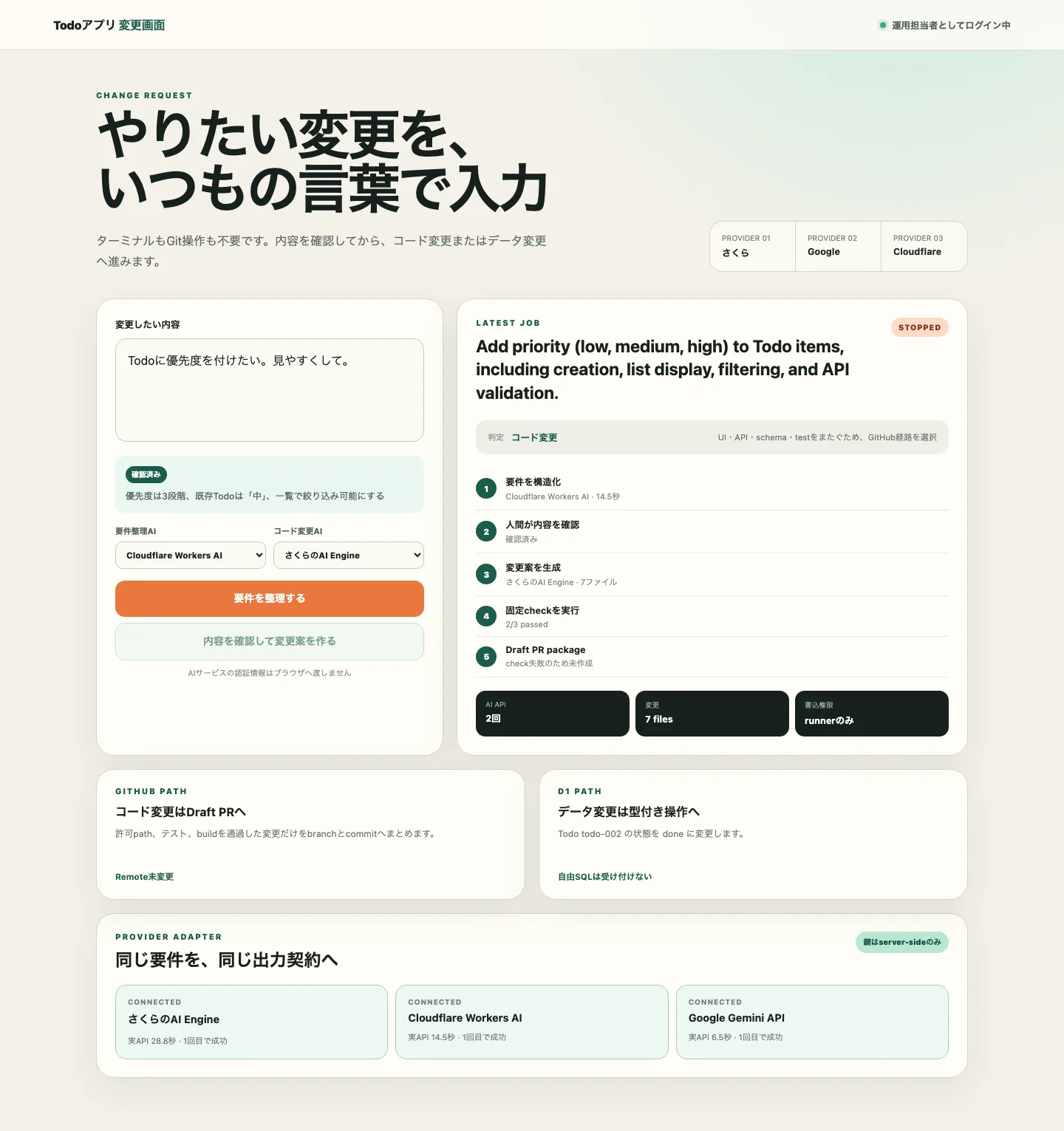
Part one connected three AI APIs through one format and confirmed that a code proposal could stop before reaching GitHub when fixed tests failed. The proposal modified seven files, but three of nine tests still failed.
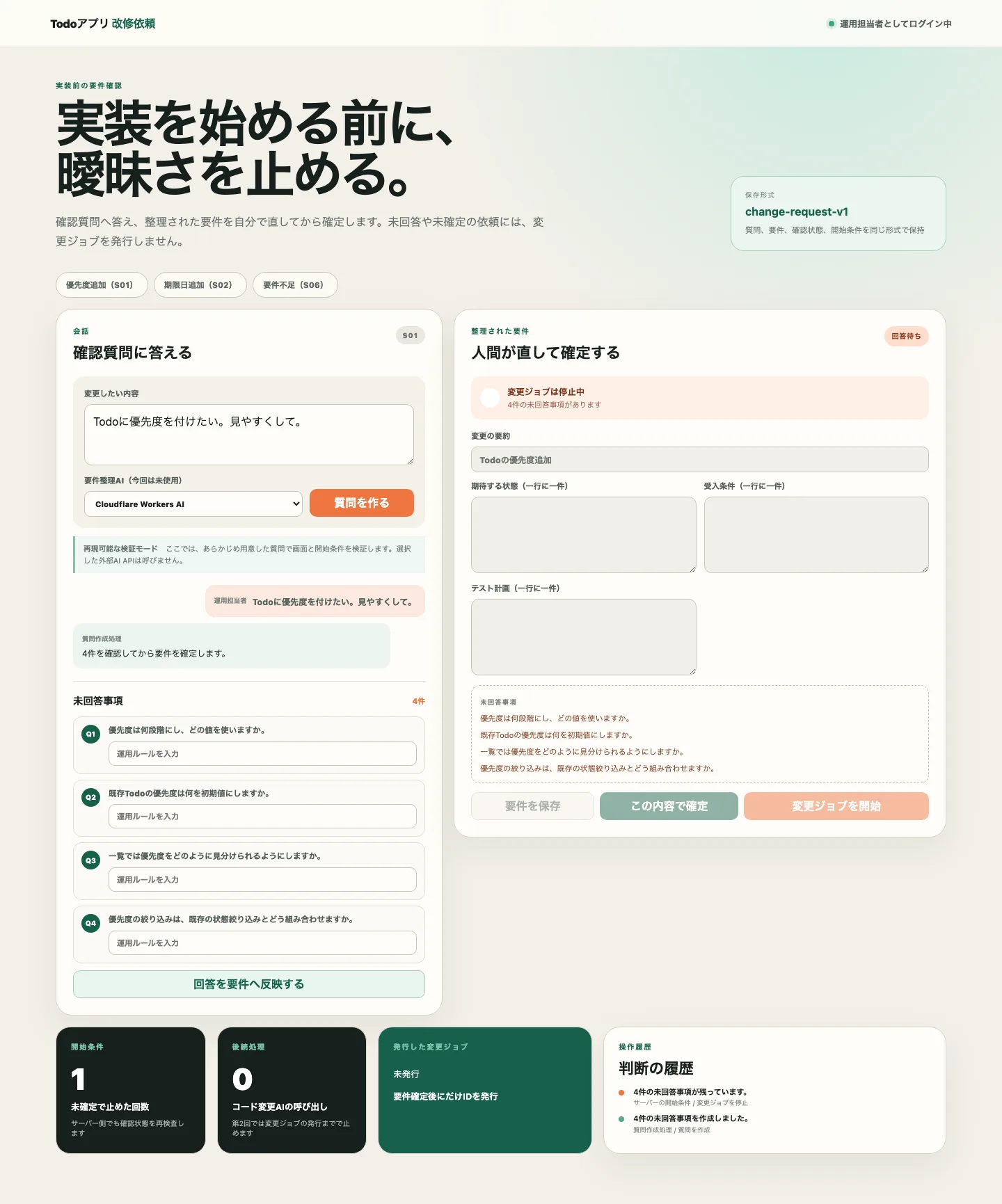
Part two returned four clarification questions for “I want priorities on my Todos. Make them easier to read” and issued a change job only after a human answered, edited, and confirmed the requirements. That job stopped while waiting for the next stage and was not connected to code modification.
Part three connects those two pieces. The confirmed change job starts the proposal from part one, passes its failures into a repair step, and proceeds until the Todo app can filter by priority.
Sending the Priority Change into an Isolated Environment
The verification plan records the priority change as S01. S01 abbreviates “Scenario 01”; the number does not indicate difficulty or priority.
The confirmed requirements from part two were:
- Use three priorities:
low,medium, andhigh - Use
mediumfor existing Todos and when no value is specified - Display priority in the list with a badge that uses both color and text
- Allow priority and the existing status to be filtered together
- Return HTTP 400 for a disallowed priority
- Make priority distinguishable by text without relying on color
When the user selects “Start change job,” the server rechecks the human confirmation state. Only a qualifying Change Request enters an isolated environment cloned from a fixed starting point.
The model receives the allowed source files and confirmed requirements. It returns a proposal rather than writing files directly. The runner rejects paths outside the allowed migration, application, UI, and test areas.
No new external AI API call was made in this verification. I saved the proposal returned by Sakura AI Engine in part one and reused it as an input that reproduces the same failures. The original proposal required one API call; replaying it in part three required zero calls.
Three Tests Failed on the Initial Proposal
The saved proposal modified seven files covering the priority migration, input validation, persistence, creation form, list badge, and tests. After the path allowlist passed, the runner applied the proposal in the isolated environment and ran the tests.
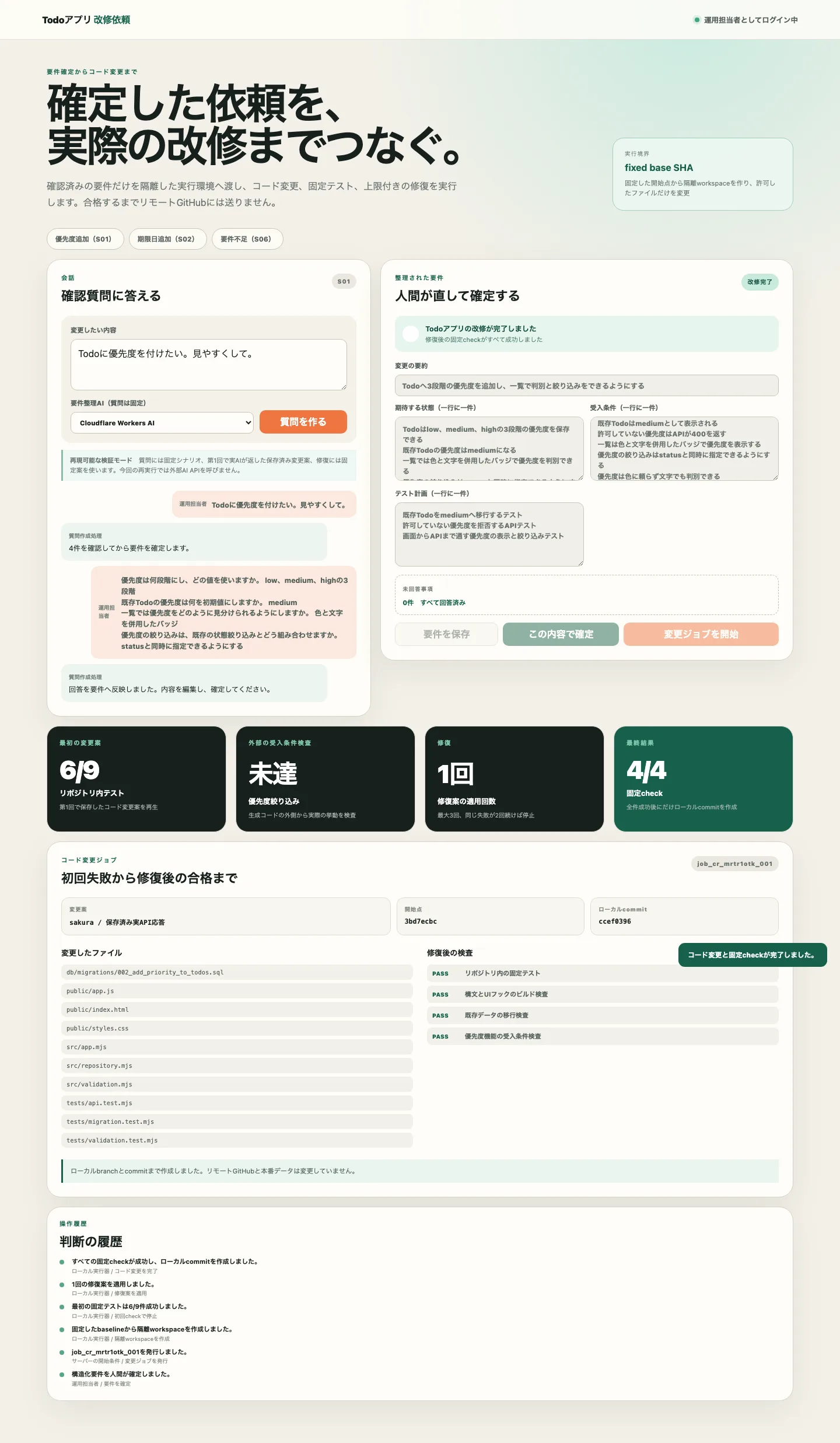
The result matched part one: six of nine tests passed and three failed.
| Failing test | Mismatch in the proposal |
|---|---|
| Column list after migration | A priority column was added, but the test still expected only the pre-change columns |
| Default priority for existing Todos | The test read a nonexistent row without creating the Todo it intended to inspect |
| Input normalization | The code now returned the default medium priority, but the test still expected the old value |
These failures did not come from the priority implementation itself. The generated tests disagreed with the contract after the change. Generating tests together with code does not guarantee that those tests represent the changed specification correctly.
Correcting only the three test expectations would make the repository tests pass. It would not satisfy the confirmed requirement that priority and status can be filtered together.
Generated Tests Missed Priority Filtering
The initial proposal could store a priority, select it in the creation form, and display it as text in the list. Neither the API nor the UI provided priority filtering.
The repository tests did not detect this omission because the generated code and generated tests missed the same requirement.
I therefore placed an acceptance check outside the area the runner can modify. This custom verification program creates three Todos with different priorities through the isolated Todo API, then requests both status=open and priority=high and asserts that only one matching item is returned. The same check group covers rejection of a disallowed priority, migration of existing Todos to medium, and the text label on the UI badge.
The initial proposal failed this check. Passing priority=high to the API had no effect, so the response contained multiple Todos filtered only by status.
If generated tests alone decide whether a change passes, the evaluator inherits the generator’s omissions. Fixing the confirmed requirements in a separate check prevented the system from reporting success after the tests were repaired but the feature was still incomplete.
Four Check Groups After the Repair
After the first failure, the runner passed the failed check names and exit codes into the repair step. This verification uses a predefined repair rather than an external AI so the same result can be reproduced.
The repair updated the generated test expectations to match the changed contract and added the missing behavior:
- Validate priority in the API and filter it together with status
- Add a priority filter to the UI
- Add badges containing the text
Low,Medium, orHigh - Add an API test combining priority and status
- Add a test that rejects filtering by a disallowed priority
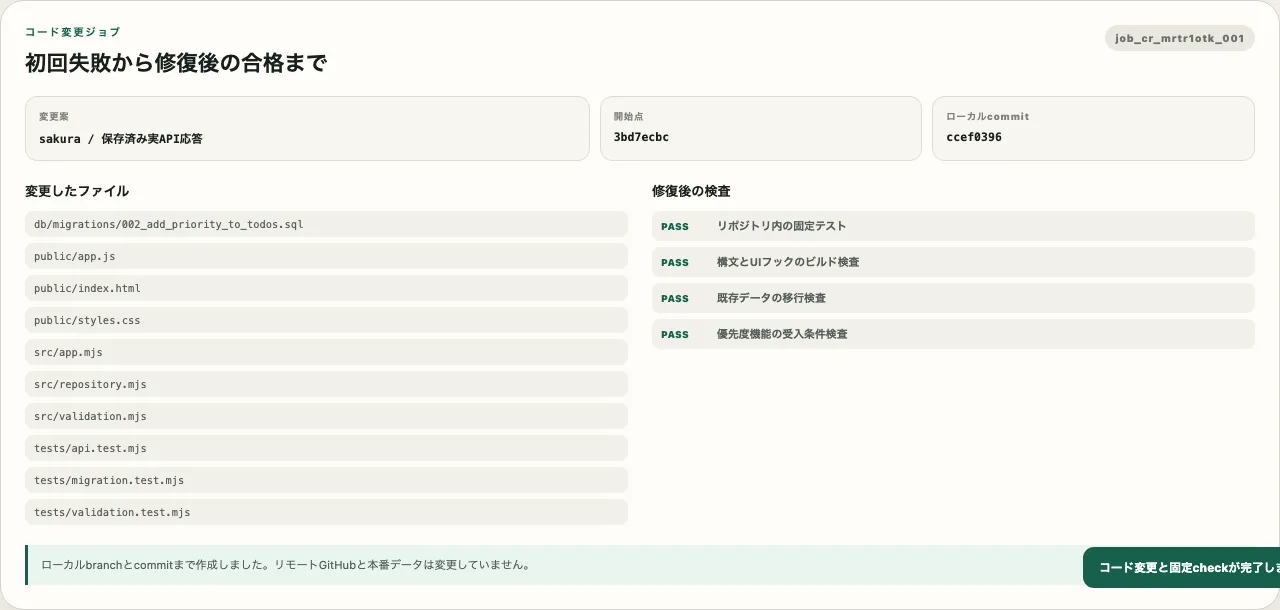
The repair increased the number of changed files from seven to ten. The runner then executed four check groups:
| Check | Result |
|---|---|
| Repository tests | 12 of 12 passed |
| JavaScript syntax and UI-component checks | Passed |
Existing-data migration to medium | Passed |
| Priority-feature acceptance checks | Passed |
Only after all checks passed did the runner commit to the local branch ai/s01-priority. It did not push to the remote GitHub repository or create a Draft PR.
The change-job interface displays the fixed starting point, ten changed files, post-repair checks, and local commit. Without opening a terminal, the user can see what failed initially, how many repairs ran, and which checks ultimately passed.
The Todo Interface After the Change
Passing checks does not prove that the interface is usable by operations staff. I started the repaired Todo app and selected the High priority filter with Playwright.
The list retained only one high-priority Todo. The same screen also includes a status filter, and the API path combining status and priority had already passed its acceptance check. The badge contains the text “Priority High” rather than relying only on color.
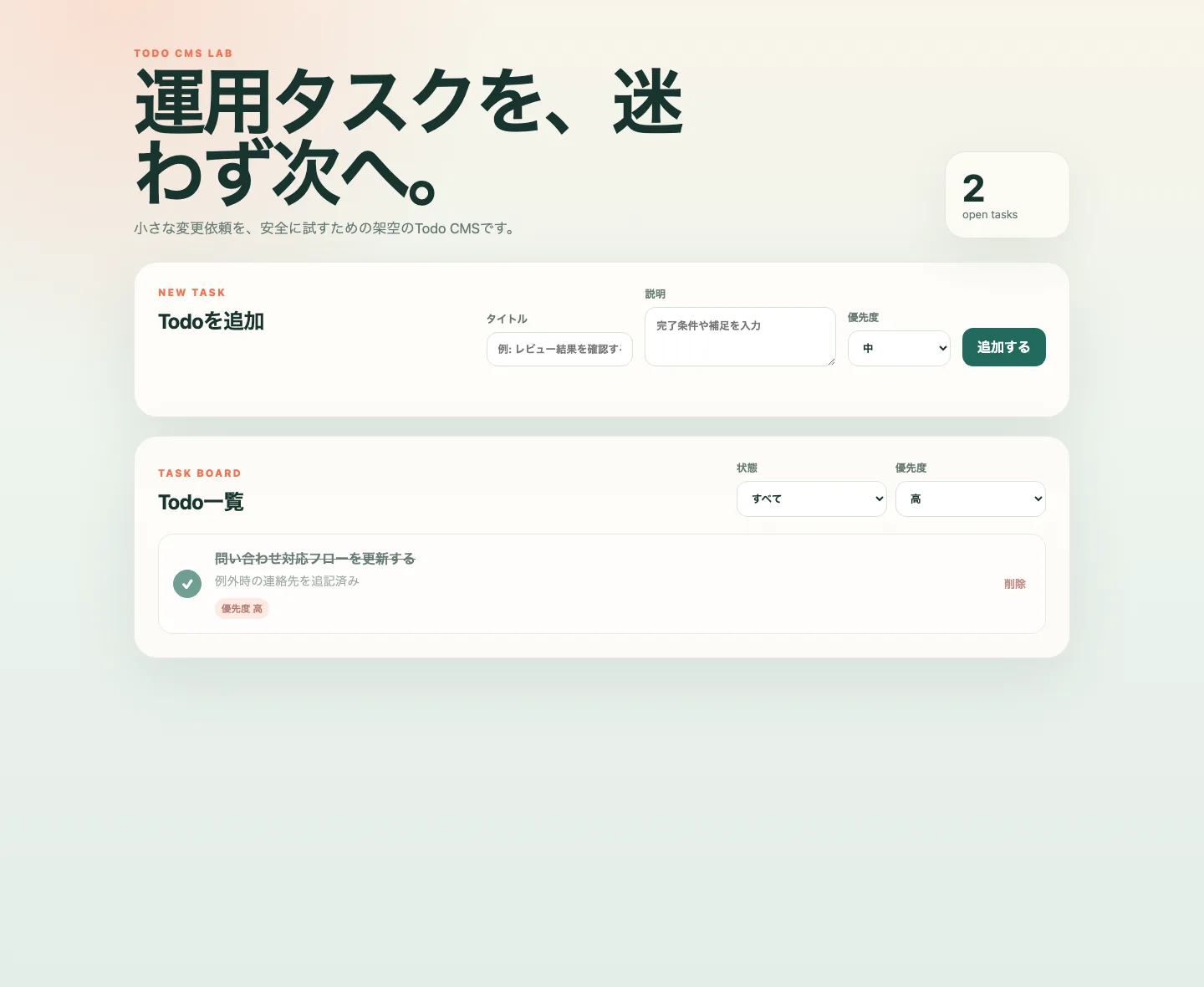
The acceptance criterion added by a human in part two, “Priority can be distinguished by text without relying on color,” now appears in the actual interface. Confirming the wording on a requirements screen is not enough; a post-change check must connect that wording to the implemented behavior.
Where the Repair Loop Stops
An unlimited repair loop increases API use and execution time and can repeatedly apply similar fixes to the same underlying failure. I set a maximum of three repair attempts.
The second stop condition is seeing the same check failure twice. The runner derives a fingerprint from the failed check name and exit code. If the fingerprint remains unchanged before and after a repair, it does not start another repair.
This verification passed every check after the first repair, so neither stop condition was reached. Unit tests for the runner cover the maximum-attempt and repeated-failure stops.
npm run verify:code-job is a custom verification script prepared for this article. It feeds the fixed priority request into a change job and checks creation of the isolated environment, application of the saved proposal, initial checks, predefined repair, rerun checks, and the local commit.
npm run verify:code-jobfirst pass: 6/9 repository tests, acceptance=failed
repair attempts: 1
final checks: 4/4
changed files: 10
remote GitHub changed: falseWhat the Predefined Repair Leaves Unverified
Part three reached a working Todo app and a local commit by creating an isolated environment from confirmed requirements, applying the saved AI proposal, and repairing its failures. Requirement confirmation and code modification, which were separate through part two, now form one operation in the dedicated web interface.
The statement “the repair loop ran” cannot be read as “AI repaired the defect by itself.” The repair was predefined; no live AI reasoned from the failure logs to produce it. Repair quality for unrestricted change requests, escalation to a human after repeated failures, and the ability to prepare acceptance checks for other types of changes remain unverified.
The decision for part three is therefore Conditional Go. The path from chat to a local code change and its stop conditions worked, but live-AI repair and reproducibility across multiple change types have not been evaluated.
The next decision depends on whether the same safety boundary survives after removing the priority-specific predefined processing. Running due dates, tags, CSV export, underspecified requests, and dangerous requests through the same runner will show whether this four-of-four result is only one example or evidence of a reusable workflow.