How to Use GLM-5.2 on Cloudflare Workers AI: Model ID, Pricing, and TypeScript Setup
A technical note covering the model ID, pricing, context length, Wrangler configuration, and TypeScript implementation for calling GLM-5.2 on Cloudflare Workers AI.
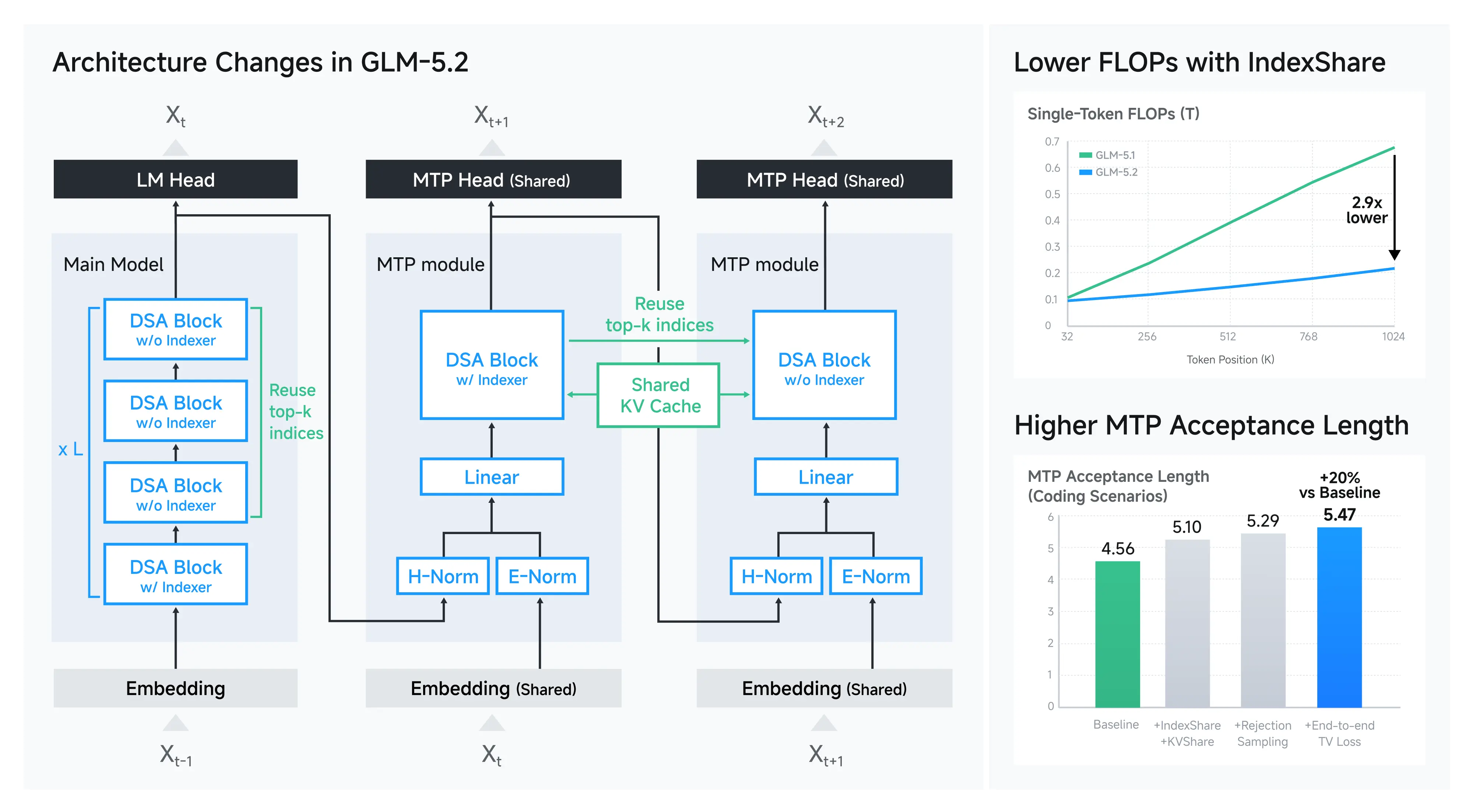
GLM-5.2, Z.ai’s agent and coding-oriented model, has been added to Cloudflare Workers AI. If you try it based on the model name alone, you’ll end up looking up the model ID, pricing, and available context length on Workers AI separately. Here, I summarize the necessary information and a minimal setup before implementation.
First, here are the specs you can check on the official Cloudflare model page.
| Property | Value |
|---|---|
| Model ID | @cf/zai-org/glm-5.2 |
| Input price | $1.40 per 1M tokens |
| Cached input price | $0.26 per 1M tokens |
| Output price | $4.40 per 1M tokens |
| Context length on Workers AI | 262,144 tokens |
| Function calling | Supported |
| Reasoning | Supported |
Pricing and limits may change. Be sure to check the GLM-5.2 model page and the Workers AI pricing table at implementation time.
What to check with Cloudflare GLM-5.2
GLM-5.2 itself is a model designed for a maximum context of 1,048,576 tokens, but at the time of Cloudflare’s release, the length available from Workers AI is 262,144 tokens. You need to think about the model’s own limit and the limit provided by the platform you’re using as separate concerns.
Also, official documentation shows support for Function calling and Reasoning. However, being supported and working stably with arbitrary tool definitions or Japanese instructions are different matters. This article covers the catalog-level compatibility and a minimal text-generation setup; it does not evaluate tool-call success rates or performance comparisons with other models.
Setting up Workers AI GLM-5.2 in Wrangler
To call the model from a Worker, add the AI binding to wrangler.jsonc. In a configuration that connects from local Wrangler to the actual Workers AI, set remote: true.
{
  "$schema": "./node_modules/wrangler/config-schema.json",
  "name": "glm-5-2-worker",
  "main": "src/index.ts",
  "compatibility_date": "2026-06-24",
  "ai": {
    "binding": "AI",
    "remote": true
  }
}
After adding the configuration, generate the type definitions including the binding with the following command.
npx wrangler typesI confirmed that Wrangler 4 can read this configuration and generate type definitions that include AI: Ai. Additionally, I verified that calling the same model ID from an authenticated account succeeds with HTTP 200 for Japanese text generation. The returned usage was 33 input tokens and 275 output tokens, for a total of 308 tokens, and the response body was stored in choices[0].message.content.
Calling GLM-5.2 from TypeScript
In the Worker itself, pass the exact model ID and messages to the AI binding’s env.AI.run().
interface Env {
  AI: Ai;
}

export default {
  async fetch(_request, env): Promise<Response> {
    const response = await env.AI.run("@cf/zai-org/glm-5.2", {
      messages: [
        {
          role: "system",
          content: "日本語で簡潔に回答してください。",
        },
        {
          role: "user",
          content: "Cloudflare Workers AIを一文で説明してください。",
        },
      ],
    });

    return Response.json(response);
  },
} satisfies ExportedHandler<Env>;
To test locally, run npx wrangler dev and send an HTTP request to the displayed URL. Because the AI binding uses the remote Workers AI, inference usage is charged even when running locally.
npx wrangler dev
curl http://localhost:8787/
The official documentation shows examples of returning env.AI.run() results as JSON for non-streaming, and returning text/event-stream with stream: true for streaming. Starting with a non-streaming setup to check input and output makes it easier to isolate issues before expanding to streaming or Function calling.
Verifying Function calling in practice
For Function calling, I first placed the tool definition directly under tools like this, and the API input validation rejected it with a missing function field error.
// This format was rejected by the GLM-5.2 API this time
tools: [{
  name: "get_weather",
  description: "指定された都市の現在の天気を取得する",
  parameters: { /* JSON Schema */ },
}]
Using the OpenAI-compatible type: "function" and function object succeeded.
tools: [{
  type: "function",
  function: {
    name: "get_weather",
    description: "指定された都市の現在の天気を取得する",
    parameters: {
      type: "object",
      properties: {
        city: { type: "string", description: "都市名" },
      },
      required: ["city"],
    },
  },
}]
In an actual test with the input “東京の現在の天気を調べてください”, finish_reason became tool_calls, and get_weather with {"city":"東京"} was returned. The usage was 188 input tokens and 50 output tokens, for a total of 238 tokens. This is a single success case; evaluating tool selection stability and argument accuracy requires multiple cases with varied input phrasing.
Key points to watch during implementation
GLM-5.2 supports long context, Function calling, and Reasoning, but a feature list alone is not enough for production decisions. At a minimum, you need to record input and output token counts, time to first token, tool call success rates, and structured output validation failure rates in your actual use case.
Especially for agent use cases, what matters is not whether a tool was called once, but whether arguments are maintained across multiple turns, whether the plan can be revised after a tool failure, and whether unnecessary calls do not increase even with long inputs. This time, I verified single-turn tool selection, but continuous behavior like this remains unverified.
Summary
The model ID for using GLM-5.2 on Workers AI is @cf/zai-org/glm-5.2, and you add the AI binding in Wrangler. The context length on Cloudflare is 262,144 tokens, and it supports Function calling and Reasoning.
On the other hand, feature compatibility and real-task stability should be evaluated separately. The practical approach is to first get the minimal text generation working, then expand validation to streaming, Function calling, and long inputs.